
Browse abandonment
A shopper who spends time on a product page is interested. A browse abandonment flow reminds them of the products they viewed, and stops as soon as they add something to the cart, start checkout or buy.
Before you start
- The Uppush app embed must be on in your theme — product views are detected on your storefront. See Theme extension.
- Shoppers must be recognisable: web push subscribers, popup subscribers, or customers logged in to their account.
- Available on the Premium and Pro plans.
Set it up
- Go to Flows and click New flow.
- Under Prevent lost sales, choose Browse abandonment · Standard and click Use this template.
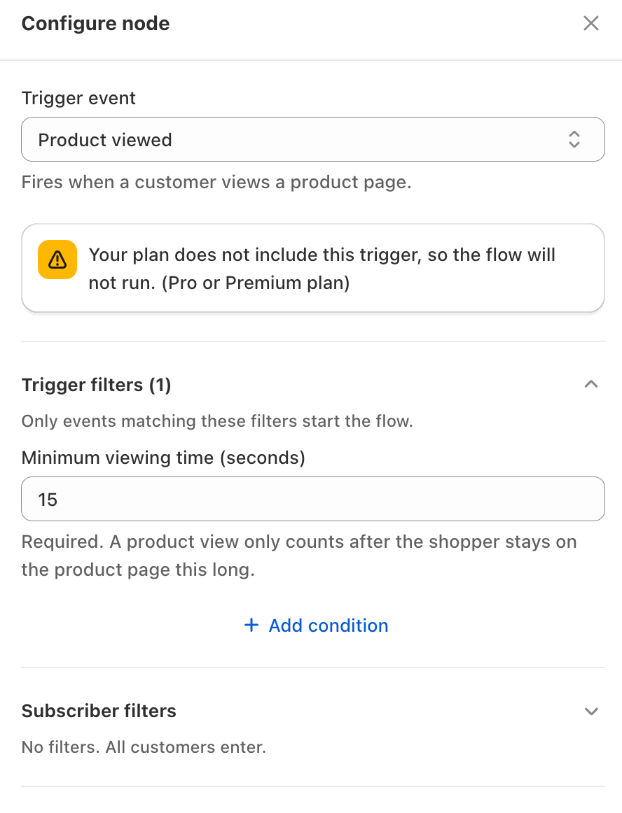
- Review the messages and the Minimum viewing time, then click Save.
- Click Turn on.
How the standard template works
| When | What is sent |
|---|---|
| 30 minutes after viewing a product | Push, then email 10 minutes later |
| 2 hours later | Push and email |
| 1 day later | Last push and email |
- Trigger: Product viewed, with a Minimum viewing time of 15 seconds — quick clicks through product pages are ignored.
- Exit when: the shopper adds a product to the cart, starts checkout or places an order.
- Re‑entry: a shopper can start the flow again 7 days after their last entry.
If the shopper views more products while the flow is running, those products are added to the same reminder (up to 5) instead of starting a new flow. The email shows them in the browsed products block.
Other versions
- Single reminder — one push and one email, 1 hour after the view.
- A/B test timing — compares a first reminder after 30 minutes with one after 4 hours.
See the template library.
Tips
- Keep it light. Browsing is a weaker signal than leaving a cart. One or two reminders without a discount usually work best.
- Raise the minimum viewing time (for example to 30 seconds) if you receive many reminders for products that were barely looked at.