
Flow template library
The template library has 33 ready‑made flows. Each one comes with its trigger, filters, exit conditions, re‑entry rule and every message already written — and translated into the languages published in your store.
To open it, go to Flows and click New flow.
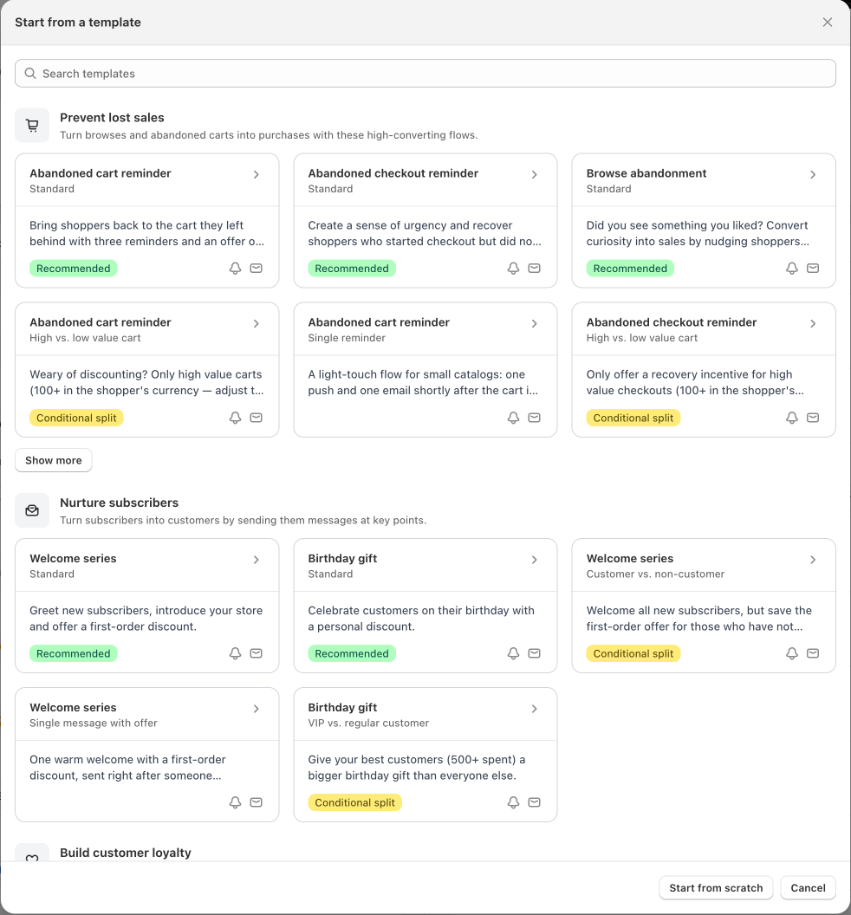
How templates are built
A few things are the same in every template, so you know what to expect:
- Push first, email ten minutes later. Each reminder is a pair: a web push notification, then the email 10 minutes later. A shopper who only subscribed to web push gets the push; a shopper who only gave their email gets the email.
- Discounts are unique per customer. When a template includes an offer, Uppush creates a one‑time discount code for each customer: 10% by default (15% for VIPs, 20% for the last winback message), valid for 7 days.
- Amounts are in your store currency. Thresholds such as 100 or more or 500 or more are examples. Change them in the condition step to match your prices.
- Everything is editable. A template is only a starting point. After you click Use this template, the flow is yours to change.
- Variants. Many goals have several versions: a Standard one, a Single one with fewer messages, versions that treat shoppers differently (for example High vs. low value cart), and A/B test versions that compare two timings.
In the tables below, "Push + email" means one reminder pair, and "after 2 hours" means after the previous reminder.
Prevent lost sales
Turn browses and abandoned carts into purchases.
| Template | Starts when | Messages | Stops when |
|---|---|---|---|
| Abandoned cart reminder · Standard ★ | A shopper adds a product to the cart | 3 reminders: 1 hour after the cart was last changed, then after 4 hours (with a discount), then after 1 day | The shopper starts checkout or places an order |
| Abandoned cart reminder · High vs. low value cart | Same as above | Carts of 100 or more: 3 reminders, with a discount on the last two. Smaller carts: 2 reminders without a discount | Same as above |
| Abandoned cart reminder · Single reminder | Same as above | 1 reminder, 1 hour after the cart was last changed | Same as above |
| Abandoned checkout reminder · Standard ★ | A checkout is not completed within 15 minutes | 3 reminders: right away, after 2 hours, after 1 day | The shopper places an order |
| Abandoned checkout reminder · High vs. low value cart | Same as above | Checkouts of 100 or more: 3 reminders, with a discount on the last two. Smaller ones: 2 reminders | Same as above |
| Abandoned checkout reminder · New vs. returning customer | Same as above | First‑time shoppers: 3 reminders with a discount. Returning customers: 2 reminders | Same as above |
| Abandoned checkout reminder · A/B test timing | Same as above | Half of shoppers get reminders right away, after 2 hours and after 1 day; the other half after 1 hour, 6 hours and 1 day | Same as above |
| Browse abandonment · Standard ★ | A shopper views a product page for at least 15 seconds | 3 reminders: after 30 minutes, after 2 hours, after 1 day | The shopper adds to cart, starts checkout or places an order |
| Browse abandonment · Single reminder | Same as above | 1 reminder after 1 hour | Same as above |
| Browse abandonment · A/B test timing | Same as above | Half of shoppers get the first reminder after 30 minutes, the other half after 4 hours; both get a second one a day later | Same as above |
A shopper can start each of these flows again 7 days after they last started it.
Nurture subscribers
Turn subscribers into customers.
| Template | Starts when | Messages | Stops when |
|---|---|---|---|
| Welcome series · Standard ★ | A shopper subscribes | 3 messages: right away (with a first‑order discount), after 2 hours, after 2 days (discount reminder) | The shopper places an order |
| Welcome series · Customer vs. non‑customer | Same as above | Shoppers who already bought: 1 welcome. Everyone else: the full 3‑message series with a discount | Same as above |
| Welcome series · Single message with offer | Same as above | 1 welcome with a first‑order discount | — |
| Birthday gift · Standard ★ | It is the customer's birthday | 1 message with a 10% birthday discount | — |
| Birthday gift · VIP vs. regular customer | Same as above | Customers who spent 500 or more get 15%, everyone else 10% | — |
A shopper receives each welcome flow only once.
Build customer loyalty
| Template | Starts when | Messages | Stops when |
|---|---|---|---|
| Customer thank you · Standard ★ | An order is placed | 1 thank‑you message the next day, with a discount for the next order | The order is cancelled or refunded |
| Customer thank you · New vs. returning customer | Same as above | First‑time buyers: thank‑you with a discount. Returning customers: a loyal‑customer thank‑you | Same as above |
| First purchase thank you & bounceback | A customer places their first order | Thank‑you the next day, then an offer 14 days later | The order is cancelled or refunded, or the customer orders again |
| First purchase anniversary | A customer places their first order | 1 message with a gift one year later | — |
| Tag VIP customers | An order brings the customer's total spending to 500 or more | Adds the VIP tag to the customer in Shopify, then sends an exclusive 15% offer the next day | — |
Encourage repeat purchases
| Template | Starts when | Messages | Stops when |
|---|---|---|---|
| Product review request · Standard ★ | An order is fulfilled | 1 review request 7 days later | The order is cancelled or refunded |
| Product review & cross‑sell | Same as above | Review request after 7 days, product recommendations 7 days after that | Same as above |
| Replenishment reminder | An order is placed | 1 reminder to restock 30 days later — change the wait to how long your products last | The customer orders again, or the order is cancelled or refunded |
| Customer winback · Standard ★ | A customer has not ordered for 30 days | 3 messages: at 30 days, at 45 days (10% off) and at 60 days (20% off) | The customer places an order |
| Customer winback · Single offer | A customer has not ordered for 60 days | 1 message with 10% off | Same as above |
| Customer winback · A/B test time delay | A customer has not ordered for 30 days | Half get the first message at 30 days, the other half at 37 days; both get an offer 15 days later | Same as above |
A customer can start a review flow again after 30 days and a winback flow again after 90 days.
Remind customers to purchase
| Template | Starts when | Messages | Stops when |
|---|---|---|---|
| Back in stock alert · Standard ★ | A product that a shopper asked to be notified about is back in stock | 1 alert right away | The shopper places an order |
| Back in stock alert · With follow‑up reminder | Same as above | Alert right away, reminder 1 day later | Same as above |
| Back in stock alert · VIP early access | Same as above | Customers tagged VIP hear right away, everyone else 2 hours later | Same as above |
| Price drop alert · Standard ★ | A product that a shopper is watching gets cheaper | 1 alert right away | The shopper places an order |
| Price drop alert · With follow‑up reminder | Same as above | Alert right away, reminder 1 day later | Same as above |
| New product launch | A new product tagged uppush is published | 1 announcement to every subscriber | — |
Update customers on their order status
| Template | Starts when | Messages | Stops when |
|---|---|---|---|
| Shipping confirmation · Standard ★ | An order is fulfilled | 1 message with the tracking details, right away | — |
★ = recommended template for that goal.
Good to know
- Using the same template twice creates two separate flows. If both are turned on, a shopper may receive messages from both — turn one off, or use entry rules to keep them apart.
- Templates and plans. Some templates use triggers that are not included in every plan. The template still opens, but you need the right plan to turn the flow on. See Plans.
- Languages. Messages are created in every language published in your store (Shopify admin → Settings → Languages). Each customer receives the version in their own language. See Actions → Languages.