
Triggers
The trigger is the event that makes a shopper start a flow. Every flow has exactly one trigger.
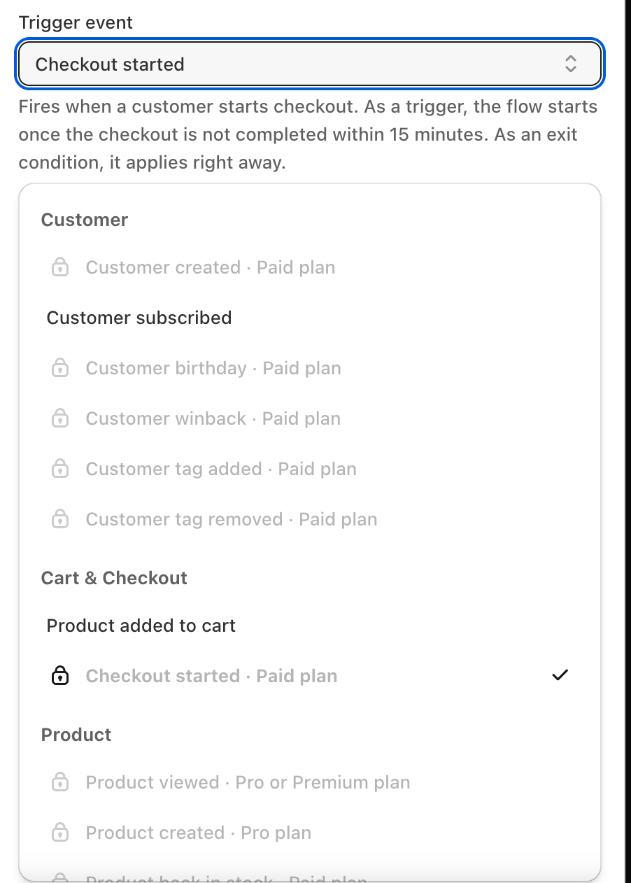
To choose or change it, click the trigger card at the top of the builder and pick an event under Trigger event.
Who receives the messages
A flow sends messages to the shopper who caused the event — the person who left the cart, placed the order, and so on. That shopper receives:
- web push notifications if they allowed notifications from your store in their browser, and
- emails if Uppush knows their email address and they have not unsubscribed from your emails.
A shopper who has only one of the two simply skips the steps for the other channel.
Customer triggers
| Trigger | Starts the flow when | Notes |
|---|---|---|
| Customer subscribed | A visitor subscribes through an Uppush popup (email) or allows web push notifications. | Email and web push sign‑ups start separate runs: a web push run only sends push steps, an email run only sends email steps. Customers who subscribe outside Uppush (for example at Shopify checkout) are not included by default — contact support if you want them included. |
| Customer created | A new customer is created in your store. | |
| Customer birthday | It is the customer's birthday. | Checked once a day. Birthdays are collected by the Birthday field of your popup. |
| Customer winback | A customer's last order was exactly a set number of days ago. | Set the number under Days since last order (1–730). Checked once a day. |
| Customer tag added | A tag is added to a customer in Shopify. | Use a trigger filter to react to one specific tag only. |
| Customer tag removed | A tag is removed from a customer in Shopify. |
Cart & checkout triggers
| Trigger | Starts the flow when | Notes |
|---|---|---|
| Product added to cart | A shopper adds a product to the cart or changes the cart. | The flow starts right away. If the shopper changes the cart again, the wait they are currently in starts over, and later messages show the latest cart. If the cart is emptied, the shopper leaves the flow. |
| Checkout started | A shopper starts checkout and has not completed it 15 minutes later. | Completed checkouts never start the flow. |
These two triggers only work for shoppers Uppush can recognise — subscribers and customers who are logged in or gave their email address.
Product triggers
| Trigger | Starts the flow when | Who receives it |
|---|---|---|
| Product viewed | A shopper stays on a product page for at least the Minimum viewing time (15 seconds by default). | That shopper. If they view more products while the flow is running, those products are added to the same reminder. |
| Product back in stock | A product variant goes from out of stock to in stock. | Shoppers who clicked Notify me for that product. |
| Product price dropped | A product's price goes down. | Shoppers who asked to be told about a lower price for that product. |
| Product created | A new active product with the Product tag you choose (uppush by default) is added to your store. | Every email subscriber and every web push subscriber. |
Product viewed, Product back in stock and Product price dropped rely on the Uppush app embed in your theme. Make sure it is turned on — see Theme extension.
Order triggers
| Trigger | Starts the flow when |
|---|---|
| Order created | A new order is placed. |
| Order paid | An order is fully paid. |
| Order fulfilled | An order is fulfilled (shipped). Shipping details such as the tracking number are available in the messages. |
| Order cancelled | An order is cancelled. |
| Order refunded | An order is refunded. |
Engagement triggers
These react to messages sent by your flows, so you can build follow‑ups — for example "if a customer clicked the welcome email, send them a best‑sellers email two days later".
| Trigger | Starts the flow when |
|---|---|
| Message opened | A customer opens an email or web push notification from a flow. |
| Message clicked | A customer clicks a link in a message from a flow. |
| Message delivery failed | An email from a flow could not be delivered (bounce). |
| Message marked as spam | A recipient reports an email from a flow as spam. |
A flow never starts itself: a message from flow A can trigger flow B, but not flow A again.
Not available yet
Product out of stock, Order returned and Message sent are listed in the builder but do not start flows yet.
Trigger settings that cannot be removed
Some triggers have a fixed rule, shown in the trigger panel as a filter you cannot delete:
- Product added to cart — starts right away and restarts the current wait when the cart changes.
- Checkout started — starts after 15 minutes without a completed order.
- Product viewed — requires a minimum viewing time.
- Product created — requires the product tag.
- Customer winback — requires the number of days since the last order.
Using a trigger as an exit condition
The same events can also be used to stop a flow — for example "stop the abandoned cart reminders when the shopper starts checkout". When used this way, Product added to cart and Checkout started apply immediately, without the 15‑minute wait. See Exit conditions.
Triggers and plans
Some triggers are only available on certain plans. A locked trigger shows the plan it needs next to its name. See Plans.