
Customer Activity Tracking
Uppush can record what visitors do on your storefront — pages they view, products they look at, items they add to the cart, checkouts they begin — and use that history to build email segments from real behaviour.
You choose which behaviours to record, and nothing is collected beyond what is ticked here.
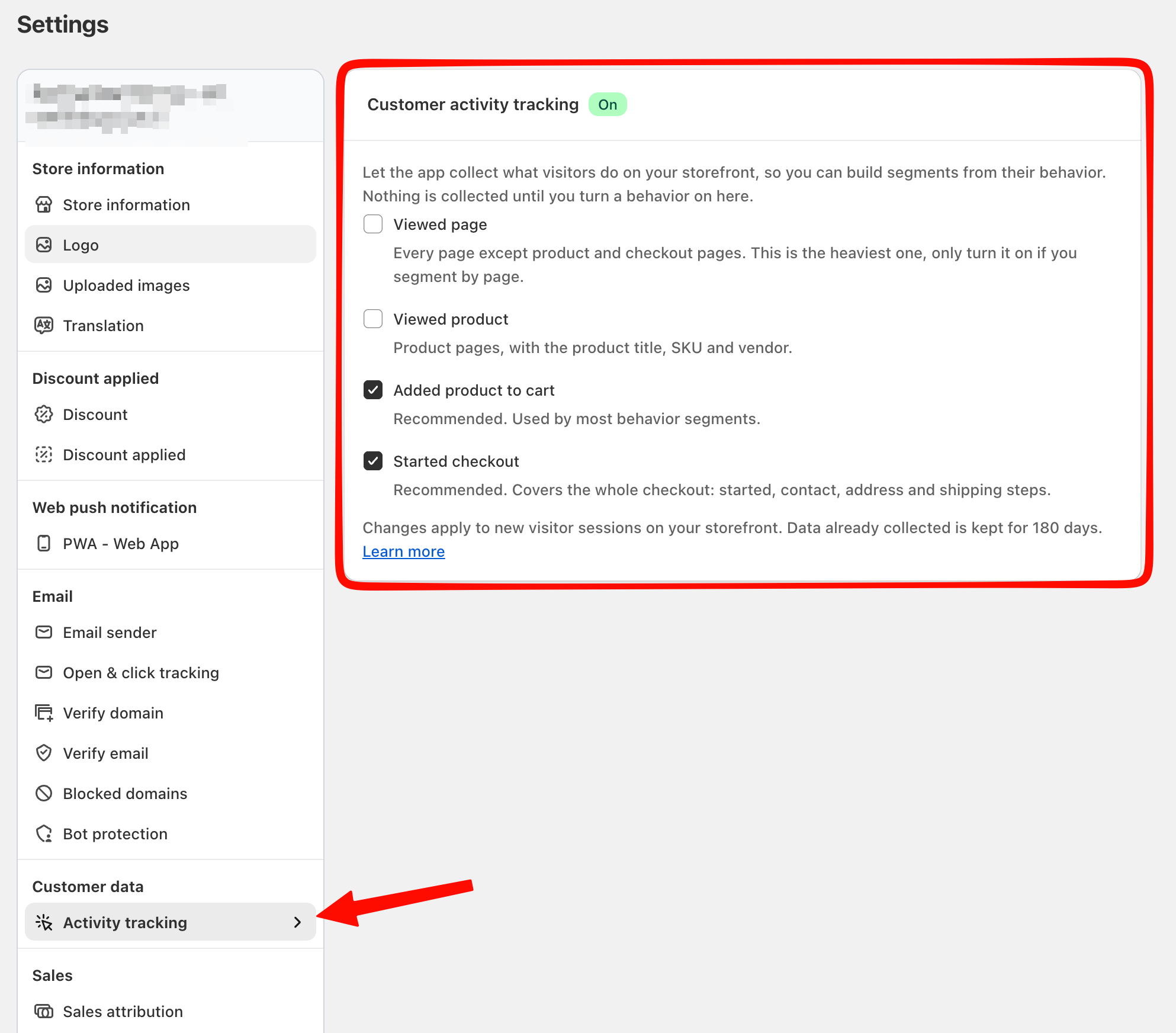
On the Free plan nothing is collected at all. When you move to Pro, Uppush starts you with Added product to cart and Started checkout switched on, because those two power most behaviour segments and cost your storefront the least. The other two stay off until you ask for them.
Why it is off by default
This data exists for one purpose: behaviour-based segments. Plenty of stores never build one, and for them the tracking is pure cost — a request from every visitor's browser on every page, and a store of activity that is never read.
So rather than collect everything and hope it gets used, Uppush asks you to switch on only the behaviours you actually segment by.
Turn it on
Go to Settings → Activity tracking and tick the behaviours you want to collect. On a Pro store, two of them are already on.
| Behaviour | What gets recorded | Weight |
|---|---|---|
| Viewed page | Every page except product and checkout pages, with the page title and URL | Heaviest |
| Viewed product | Product pages, with product title, SKU, vendor and price | Moderate |
| Added product to cart | Items added to the cart, with product details and price | Light |
| Started checkout | The whole checkout — started, contact, address and shipping steps — with line items, totals and shipping details | Light |
Click Save. The change applies to new visitor sessions on your storefront; visitors already browsing keep the setting they arrived with.
Which ones to choose
The two that are on by default — Added product to cart and Started checkout — are the ones most stores need. They power the most useful segments (abandoned checkout, interested-but-never-bought, cart value) and they only fire when a visitor takes a real action, so they stay cheap on a busy store. Leave them on unless you have a reason not to.
Add Viewed product if you want to segment by what people browsed, for example to follow up on a specific collection.
Leave Viewed page off unless you genuinely segment by page. It fires on almost every page view, which makes it by far the heaviest of the four, and few stores build segments from it.
Requirements
- Pro plan. The options are visible but locked on the Free plan.
- The Uppush app embed must be active in your theme. Tracking is delivered through it, so if the embed is disabled nothing is collected regardless of what is ticked here. See Settings → Theme extension.
What the data is used for
Three things, all inside Uppush:
- Email segments — the Customer behavior conditions: Viewed page, Viewed product, Added to cart, Started checkout.
- The suggestion lists in the segment builder — when you filter by product title or SKU, the options offered come from behaviour already collected.
- A customer's activity timeline — the history shown on an individual contact's page.
It is not used by your automations. Abandoned cart recovery, abandoned checkout recovery, browse abandonment, back-in-stock and price drop all get their data elsewhere and keep working exactly the same whether this is on or off.
Notes
Only identified customers are tracked. Activity is recorded against a known contact. Anonymous visitors who have never subscribed or given an email address are not recorded.
Collection starts from the moment you turn it on. There is no history for the period before that, so a segment such as "viewed a product in the last 90 days" only reaches back to the day you enabled it.
Activity is kept for 180 days, then removed automatically.
Turning a behaviour off does not delete anything. Existing activity stays for the rest of its 180 days and segments keep matching on it — they simply stop receiving anything new.
Your choices are remembered if your plan changes. Drop to Free and collection stops within minutes, but the tick boxes stay as you left them and resume as soon as you return to Pro.
Upgrading only sets a starting point, it never overwrites you. If anything is already ticked, moving to Pro leaves your choices exactly as they are.
Troubleshooting
A segment using Customer behavior conditions finds nobody.
Check that the matching behaviour is ticked here. The segment editor shows a warning banner naming any behaviour it needs that is not being collected — that banner is the fastest way to spot the mismatch.
If it was only turned on recently, also widen the segment's time window. There is no data from before you enabled it.
The options are greyed out.
Your store is on the Free plan. Behaviour tracking is a Pro feature.
It is switched on but nothing is being recorded.
Confirm the Uppush app embed is enabled in your theme under Settings → Theme extension. Then check the contact you are testing with is a known customer — your own visit only counts if you are signed in to the store as a customer Uppush already knows.
I want to stop all tracking.
Untick all four and save. Uppush stops collecting storefront activity immediately for new sessions.