
Abandoned cart recovery
Many shoppers add products to their cart and leave. An abandoned cart flow reminds them — first with a web push notification, then by email — and stops as soon as they move on to checkout or buy.
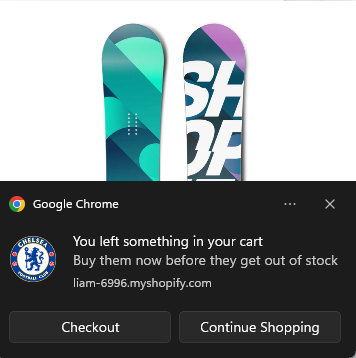
Before you start
- The Uppush app embed must be on in your theme, because the cart is read from your storefront. See Theme extension.
- Shoppers must be recognisable. Uppush can only remind shoppers who subscribed (web push or email popup) or are logged in to their customer account.
- Available on every plan, including Free.
Set it up
- Go to Flows and click New flow.
- Under Prevent lost sales, choose Abandoned cart reminder · Standard and click Use this template.
- Review the messages, the discount and the timing (see below), then click Save.
- Click Turn on.
How the standard template works
| When | What is sent |
|---|---|
| 1 hour after the cart was last changed | Push, then email 10 minutes later |
| 4 hours later | Push and email with a 10% discount |
| 1 day later | Last push and email |
- Trigger: Product added to cart, with the filter Total quantity is at least 1.
- Exit when: the shopper starts checkout, or places an order.
- Re‑entry: a shopper can start the flow again 7 days after their last entry.
The cart keeps the flow up to date
- If the shopper changes the cart while waiting, the current wait starts over. Reminders always go out a set time after the last change, and show the latest cart.
- If the shopper empties the cart, they leave the flow.
- When the shopper starts checkout, this flow stops — and your abandoned checkout flow takes over if they do not finish.
Other versions
- High vs. low value cart — only carts of 100 or more (in your store currency) receive discounts.
- Single reminder — one push and one email, 1 hour after the cart was last changed.
See the template library.
Tips
- Change the first wait to suit your store. Shorter (30 minutes) works for impulse purchases; longer (3–4 hours) for considered purchases.
- Show the cart in the email. The template already includes the abandoned cart block. Read more in Event‑based items.
- Keep cart and checkout reminders apart. In your abandoned checkout flow, use Hold back customers busy in other flows and select this flow.