
Test your flow
Before a flow reaches real customers, check two things: that shoppers take the path you expect, and that the messages look right.
Walk through the flow with Test mode
Test mode follows your flow step by step with sample data. Nothing is sent and waits are skipped, so you get the result instantly.
- Open the flow in the builder.
- Click Test at the top of the builder.
- Under Trigger data (JSON), use the Sample payload or change its values — for example raise the cart total to see what a high‑value cart does.
- Click Run test.
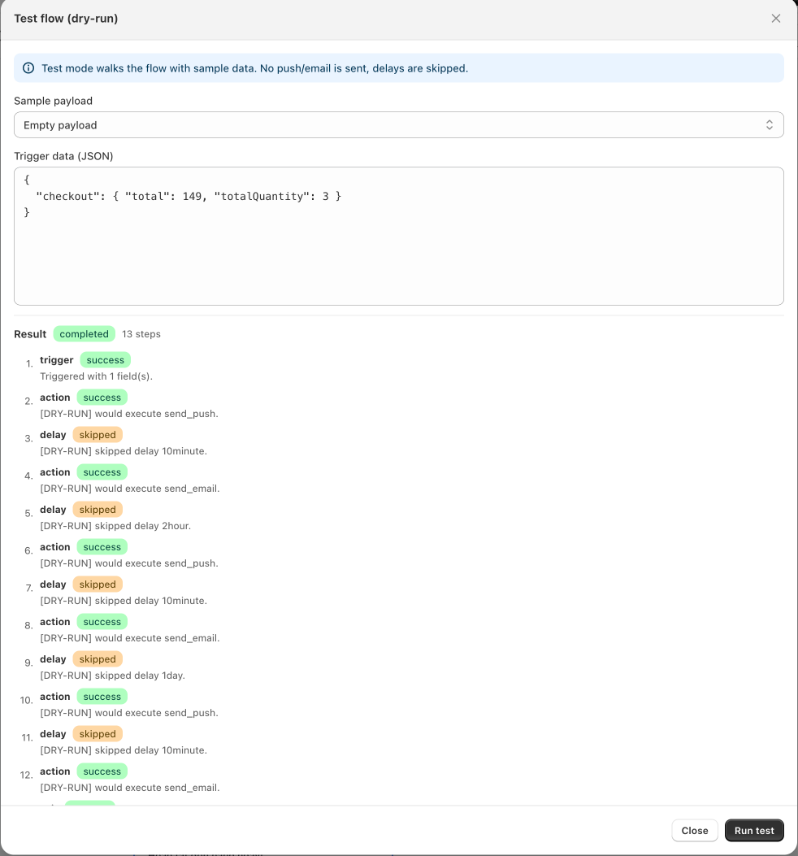
The Result lists every step the shopper would pass, which branch each condition chose, and how the run ends. Run the test again with different values to check every path.
Use Test mode to check:
- Conditions — does a cart of 150 go down the True path and a cart of 50 down the False path?
- Filters — does an event that should be ignored actually stop at the trigger?
- The end — does every path finish with an End card?
INFO
Test mode checks the logic of the flow. It does not check entry rules or the sending window, and it does not send messages.
Send yourself a test email
- Click an email step.
- Enter your address under Send test email and click Send.
The flow must be saved first. Check the email on both desktop and phone, and in every language you care about.
Check web push notifications
To see a notification on your own device, subscribe to web push notifications on your storefront, then take the action that starts the flow — for example add a product to your cart and wait.
To repeat a test, clear the subscription in your browser: see Ways to reset your browser for testing.
Test with a real order or cart
The surest test is a real one:
- Turn the flow on.
- Do what a shopper would do — subscribe, add to cart, start checkout, place a test order.
- Open Executions in the builder to watch your own run move through the steps. See Flow reports and execution log.
Shorten the waits while testing
Set the waits to a few minutes while you test, then set them back before you go live. Remember that saving an active flow removes customers who are in the middle of it.
Keep in mind the rules that may hold you back on a second try, such as Only once or a 7‑day re‑entry rule. Use a different email address, or relax the rule while testing.